
First AI Collaboration
In the Quick Start, you set up a project and generated a requirements document. Now let’s go all the way — from a one-sentence idea to a fully tested, production-ready codebase.
Project: Short-Link — a public URL shortening service (like bit.ly) AI Tool: Claude Code (the same workflow applies to Cursor and OpenCode) Time: ~60 minutes across all phases
The Big Picture
Section titled “The Big Picture”OpenLogos follows a strict WHY → WHAT → HOW progression. Each phase reads the previous phase’s output, so context accumulates — no “vibe coding”, no guesswork.
| Phase | Name | Skill | Output |
|---|---|---|---|
| 1 | Requirements | prd-writer | Scenarios + acceptance criteria |
| 2 | Product Design | product-designer | Feature specs + HTML prototypes |
| 3-0 | Architecture | architecture-designer | Tech stack + system diagram |
| 3-1 | Scenario Modeling | scenario-architect | Sequence diagrams per scenario |
| 3-2 | API + DB Design | api-designer + db-designer | OpenAPI spec + SQL schema |
| 3-3 | Test Case Design | test-writer | Unit tests + scenario tests |
| 3-4 | Code Generation | — | Business code + test code |
| 3-5 | Verification | openlogos verify | Gate 3.5 PASS / FAIL |
Let’s walk through each one.
Phase 1: Requirements (WHY)
Section titled “Phase 1: Requirements (WHY)”Prompt: Help me write requirements
The AI loads the prd-writer Skill, reads the project config, then asks you a few key questions about the product — positioning, core features, scope decisions.
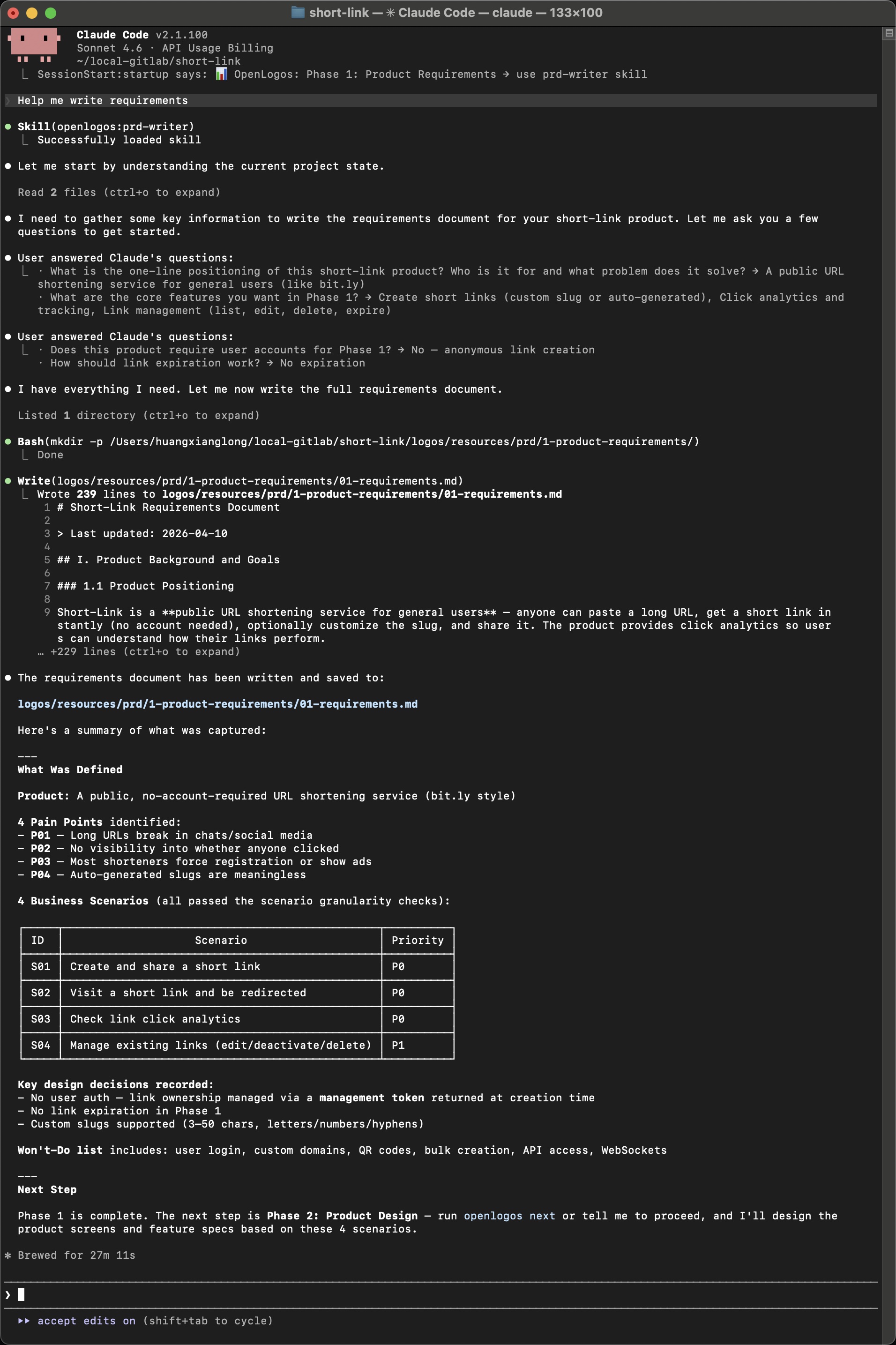
After two rounds of Q&A (about 3 minutes of human input), the AI produces a 239-line requirements document with:
- Product positioning — “A public URL shortening service for general users”
- 4 pain points (P01–P04) — long URLs break in chat, no click visibility, etc.
- 4 business scenarios with priorities:
| ID | Scenario | Priority |
|---|---|---|
| S01 | Create and share a short link | P0 |
| S02 | Visit a short link and be redirected | P0 |
| S03 | Check link click analytics | P0 |
| S04 | Manage existing links (edit/deactivate/delete) | P1 |
- Key design decisions — anonymous links via management token, custom slugs, no expiration in Phase 1
- Won’t-Do list — user login, custom domains, QR codes, bulk creation
The document is saved to logos/resources/prd/1-product-requirements/01-requirements.md.
Phase 2: Product Design (WHAT)
Section titled “Phase 2: Product Design (WHAT)”Prompt: Help me create the product design based on requirements
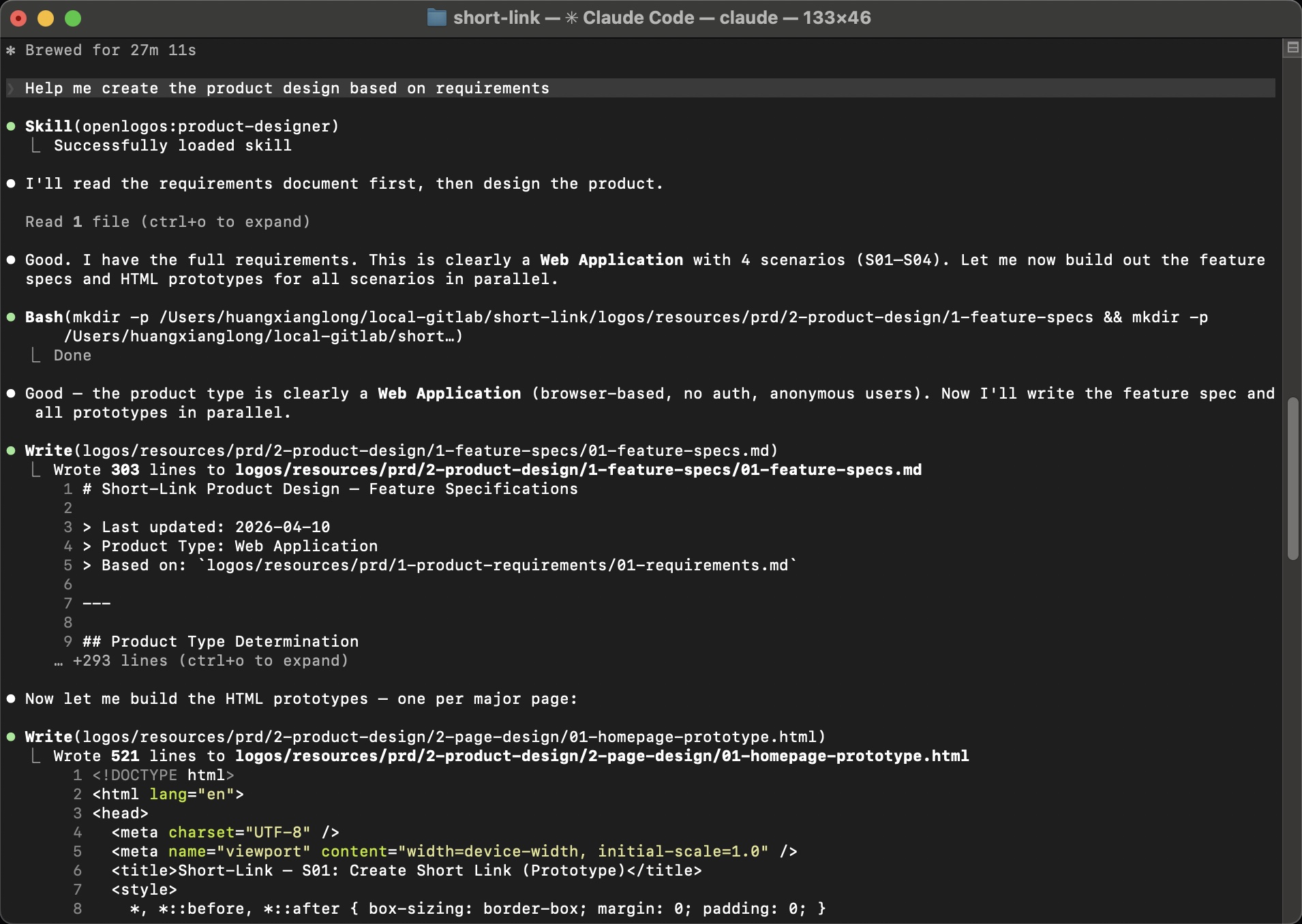
The AI loads the product-designer Skill, reads the requirements, determines this is a Web Application with 4 scenarios, and produces two types of output:
Output 1: Feature Specifications
Section titled “Output 1: Feature Specifications”A 303-line feature spec covering interaction flows, UI component specs, state transitions, and error handling for all 4 scenarios:
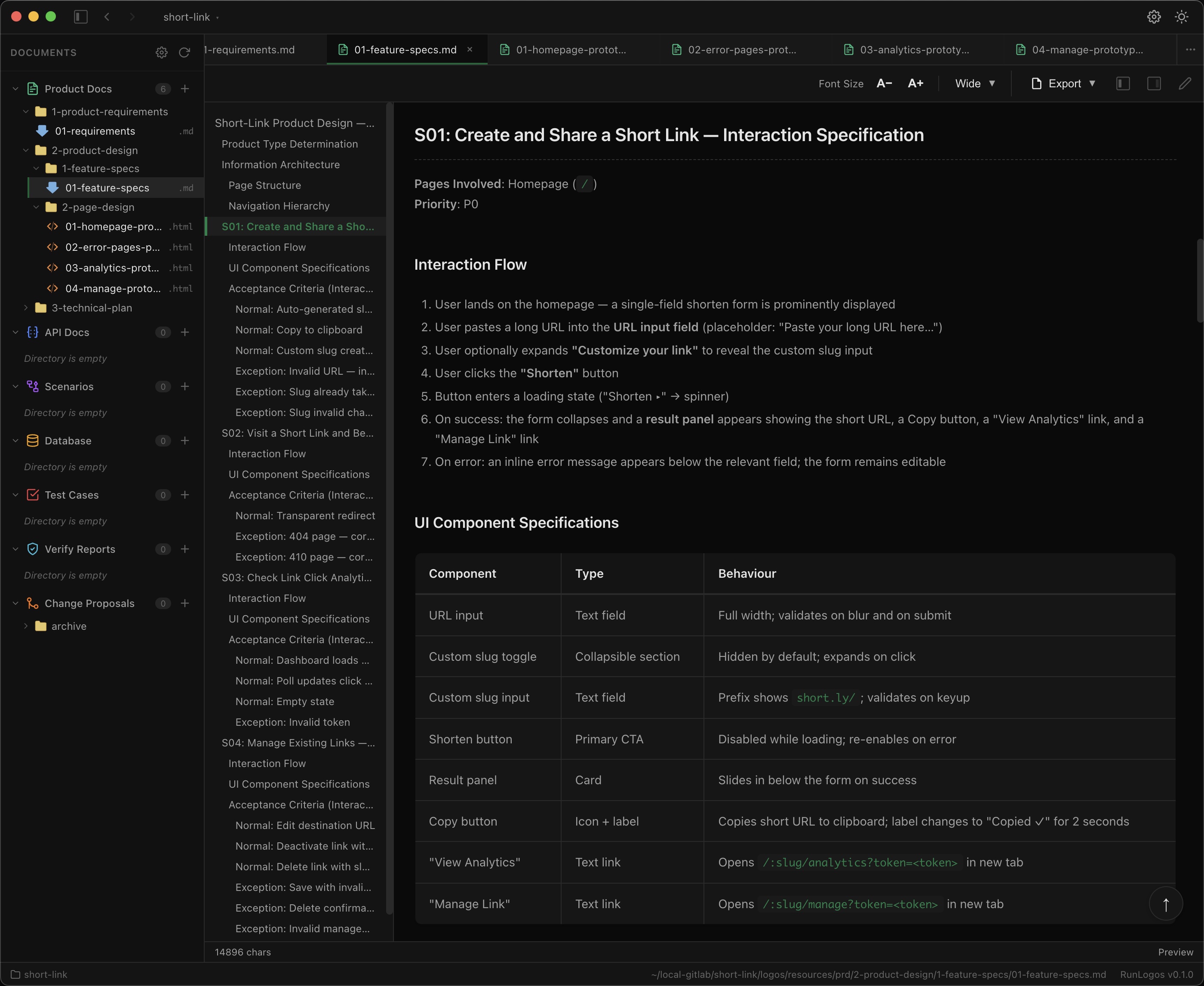
Each scenario has:
- Interaction flow — step-by-step user journey
- UI component specifications — type, behavior, validation rules
- Acceptance criteria — normal + exception paths
Output 2: Interactive HTML Prototypes
Section titled “Output 2: Interactive HTML Prototypes”Four clickable HTML prototypes — one per scenario — with working buttons, form validation, modals, and state switching:
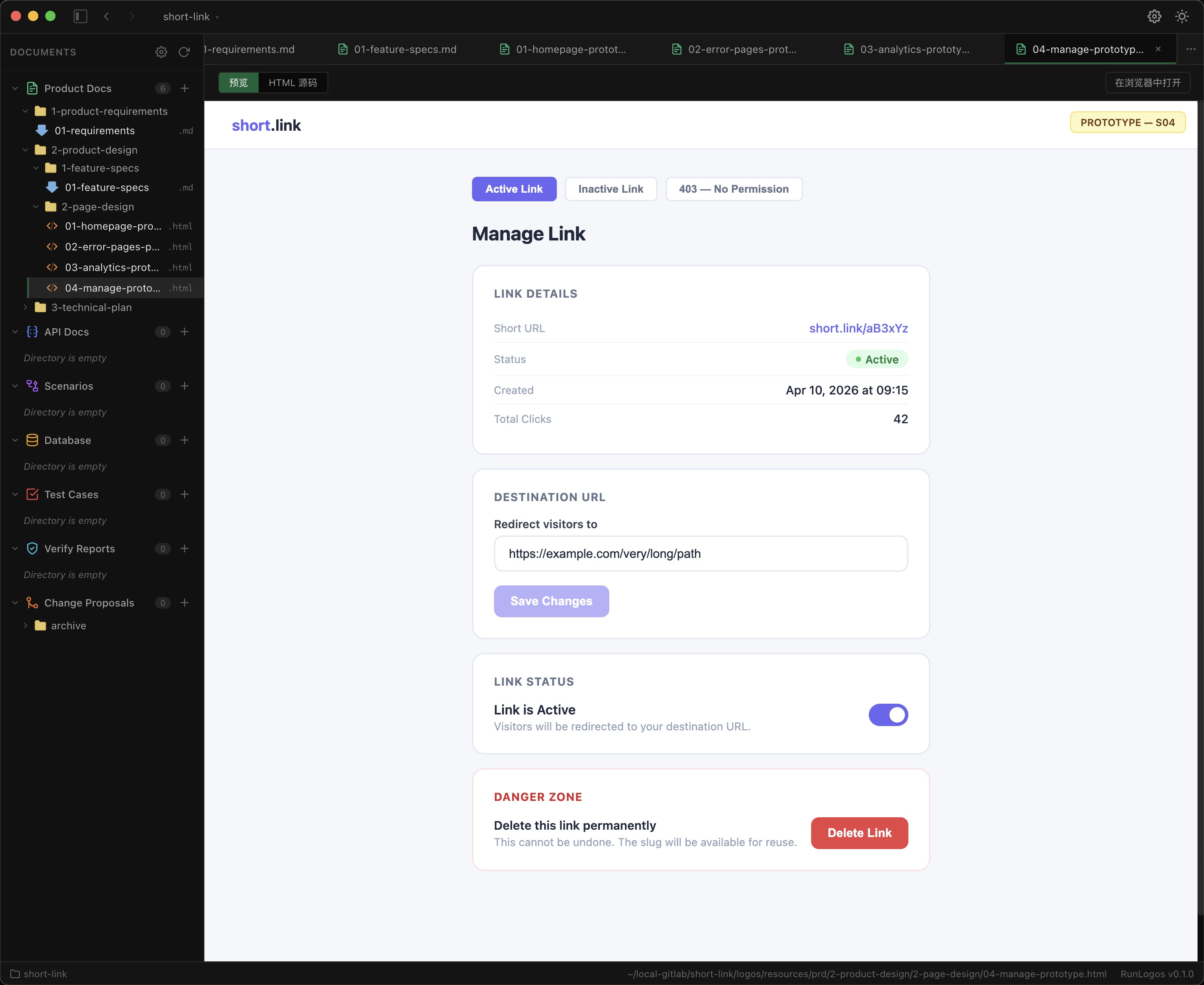
The prototypes are real HTML files you can open in any browser. They demonstrate the exact user experience before a single line of business code is written.
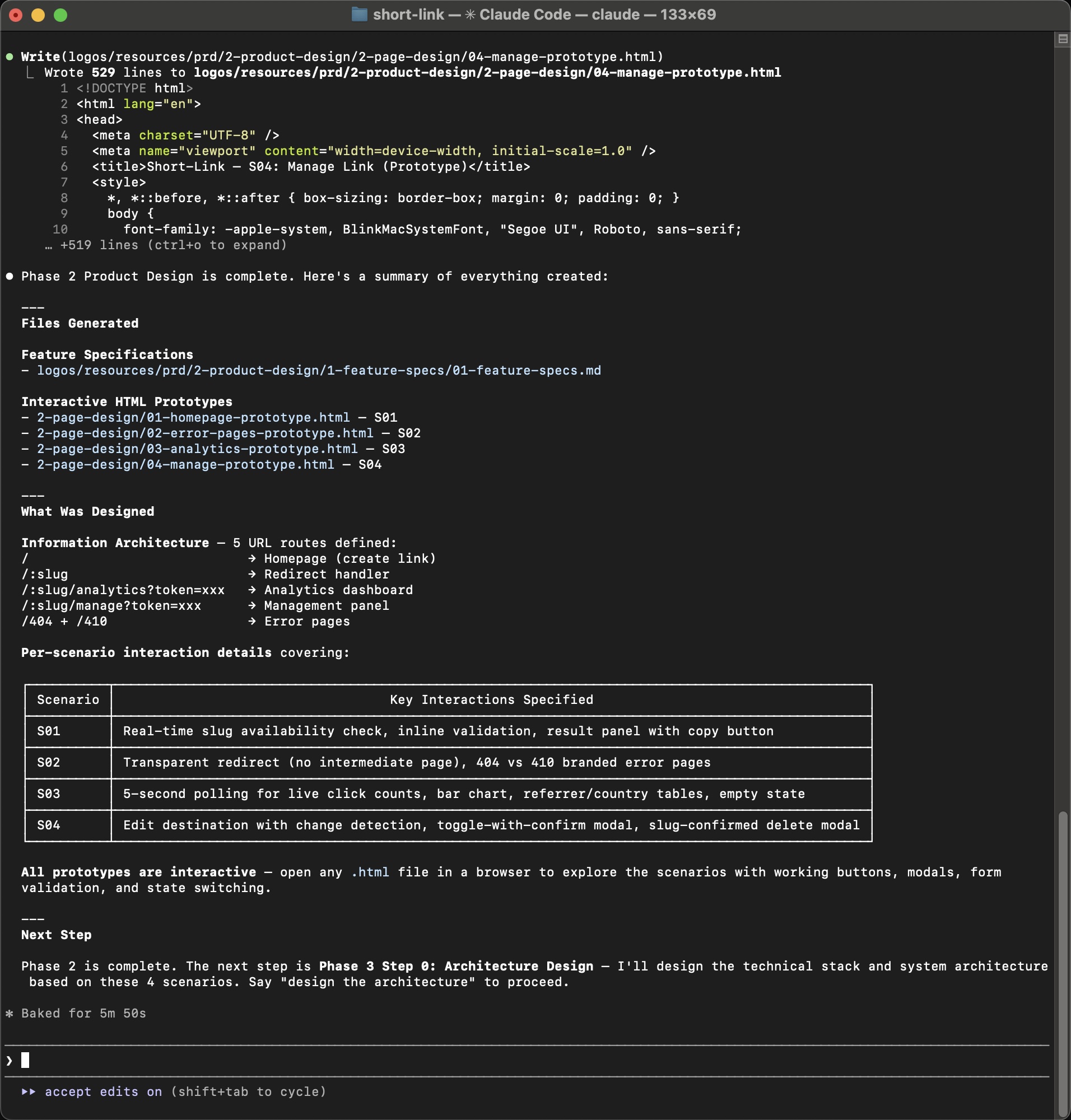
Phase 2 deliverables:
1-feature-specs/01-feature-specs.md— 303-line feature specification2-page-design/01-homepage-prototype.html— S01 Create Short Link2-page-design/02-error-pages-prototype.html— S02 Error Pages2-page-design/03-analytics-prototype.html— S03 Analytics Dashboard2-page-design/04-manage-prototype.html— S04 Manage Link
Phase 3-0: Architecture
Section titled “Phase 3-0: Architecture”Prompt: Help me design the technical architecture
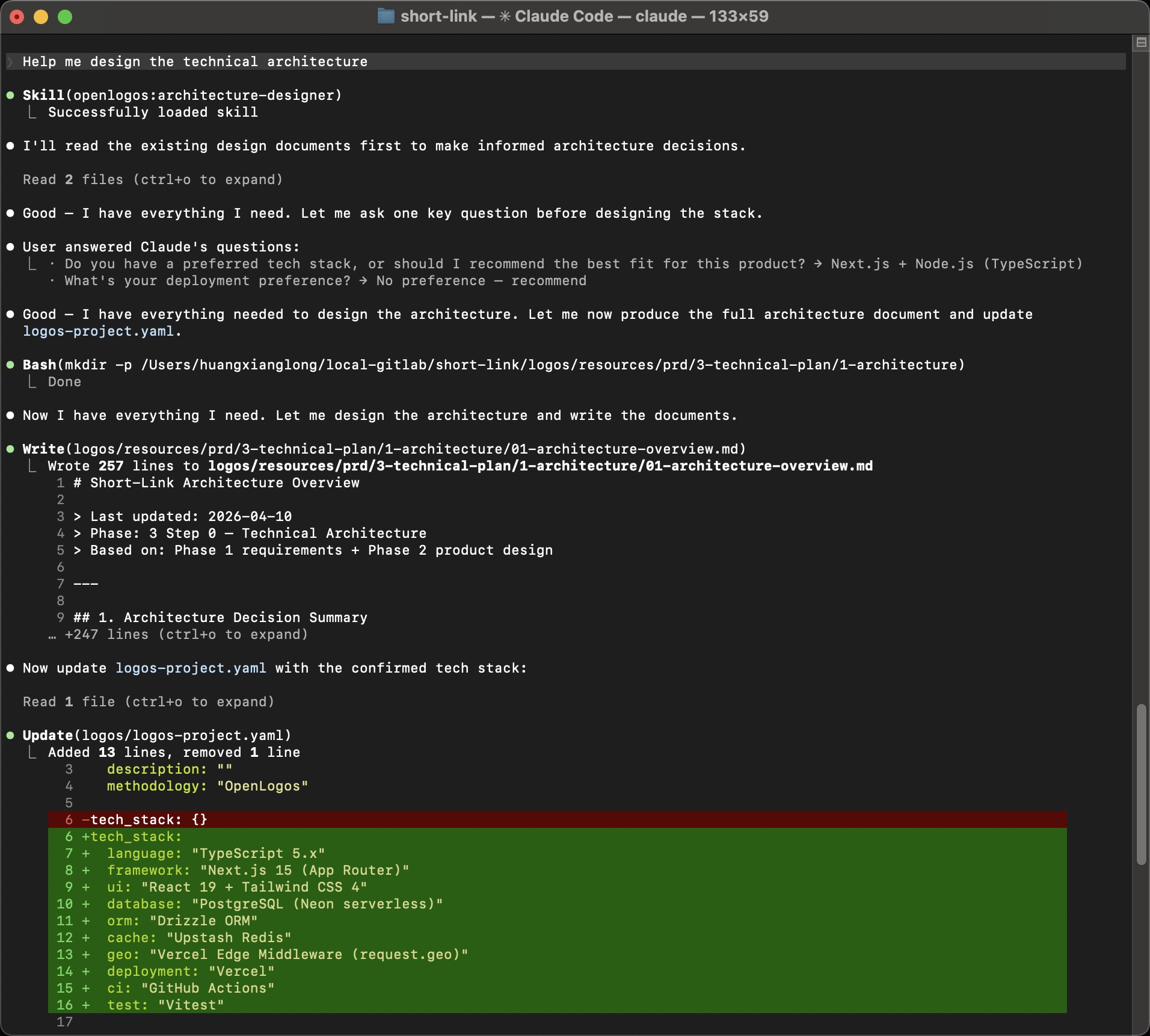
The AI loads the architecture-designer Skill, reads both the requirements and the product design, asks one question about tech preferences, then produces the architecture:
Architecture Decision
Section titled “Architecture Decision”Pattern: Monolithic Full-Stack (Next.js)
The rationale is documented: focused utility product, 4 scenarios, no complex background processing, small team (1–3 engineers) — a single deployable unit with zero operational complexity.
The architecture document also updates logos-project.yaml with the confirmed tech stack:
tech_stack: language: "TypeScript 5.x" framework: "Next.js 15 (App Router)" ui: "React 19 + Tailwind CSS 4" database: "PostgreSQL (Neon serverless)" orm: "Drizzle ORM" cache: "Upstash Redis" test: "Vitest"System Architecture Diagram
Section titled “System Architecture Diagram”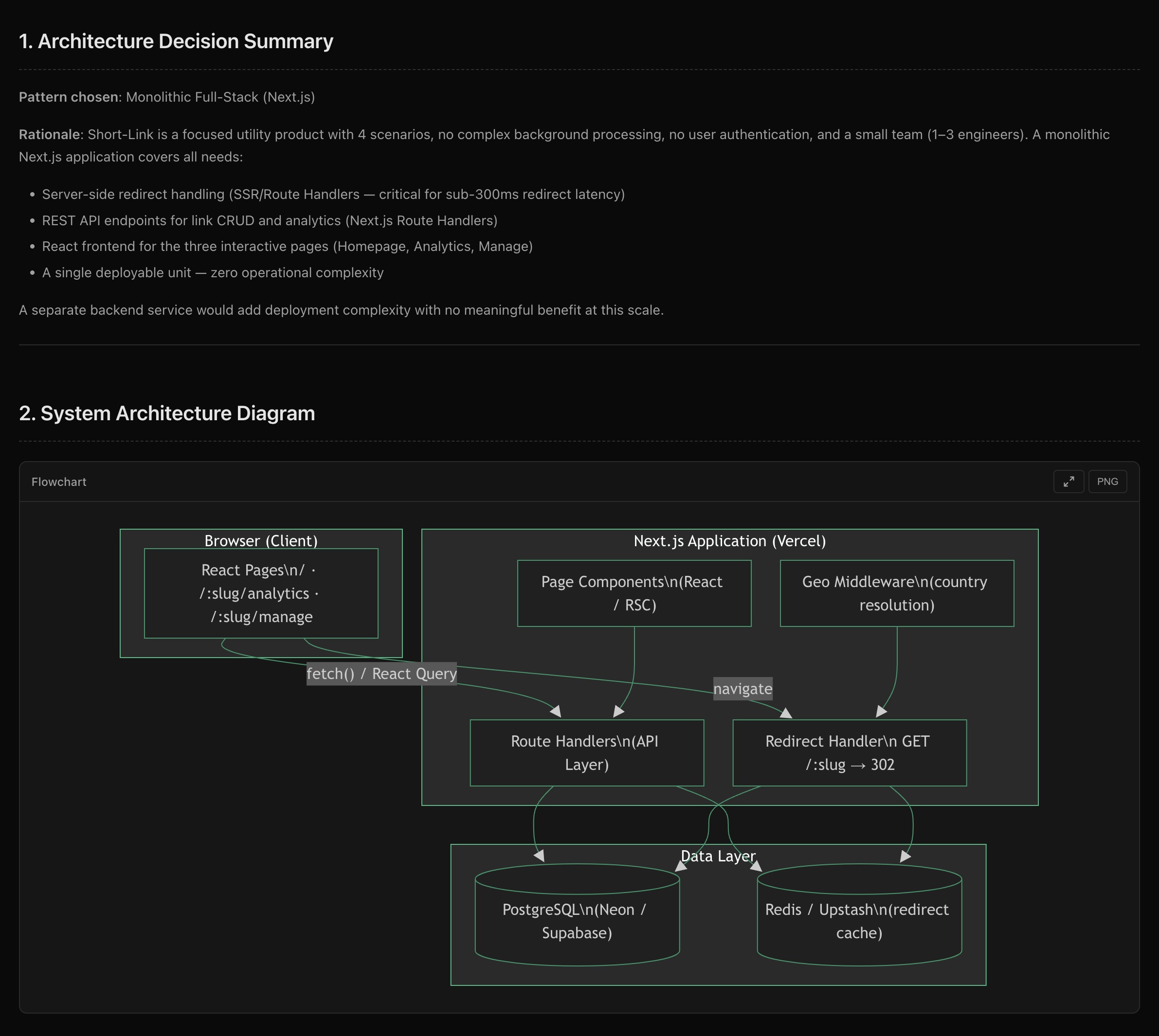
The diagram shows the three-layer structure: Browser → Next.js (Page Components + Route Handlers + Edge Middleware) → Data Layer (PostgreSQL + Redis Cache).
Phase 3-1: Scenario Modeling
Section titled “Phase 3-1: Scenario Modeling”Prompt: Help me model business scenarios
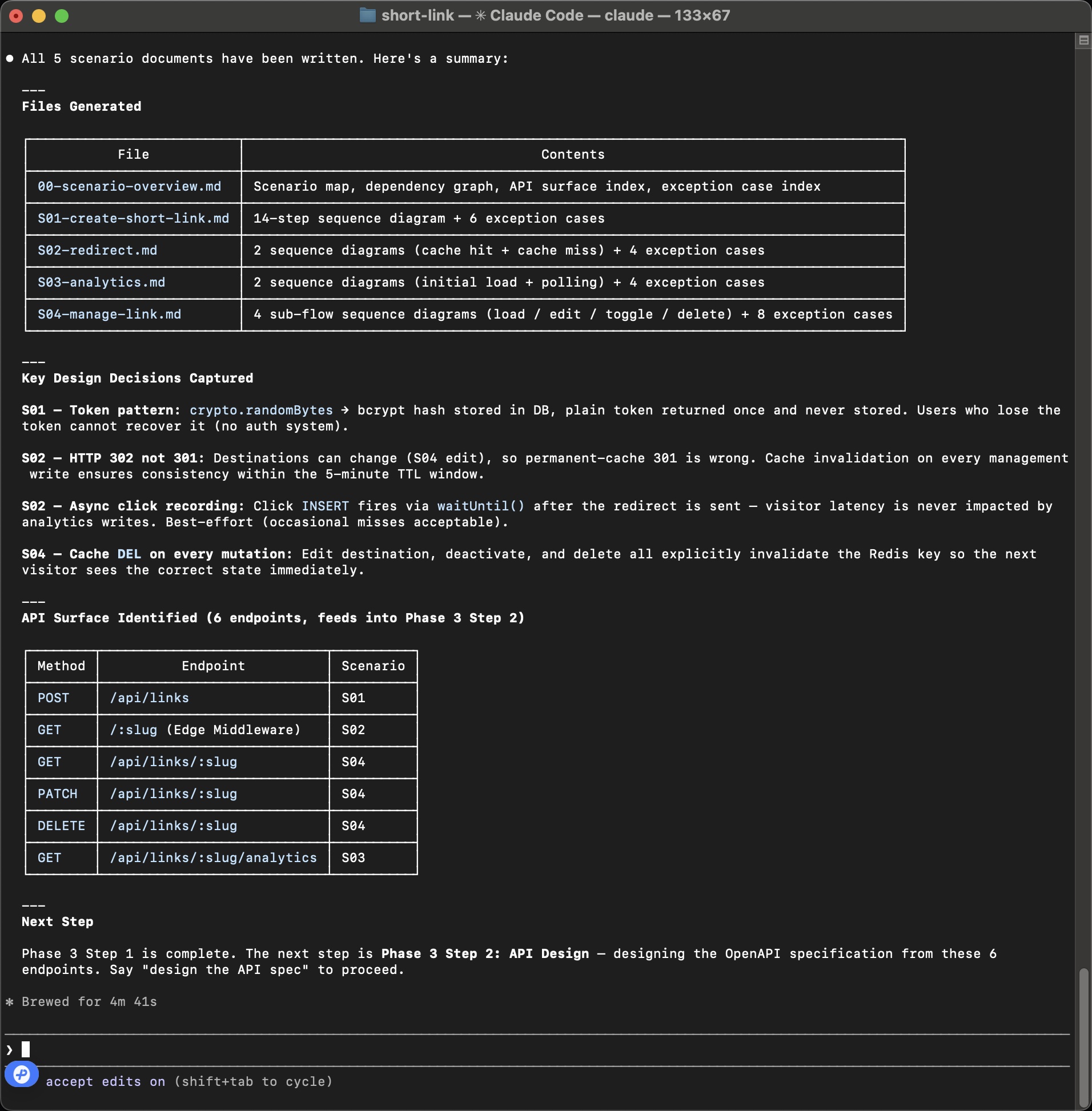
The AI loads the scenario-architect Skill and generates detailed sequence diagrams for all 4 scenarios. Each scenario becomes a step-by-step technical specification with exact API calls, data flows, cache strategies, and exception paths.
What gets generated
Section titled “What gets generated”| File | Contents |
|---|---|
00-scenario-overview.md | Scenario map, dependency graph, API surface index |
S01-create-short-link.md | 14-step sequence diagram + 6 exception cases |
S02-redirect.md | 2 sequence diagrams (cache hit + cache miss) + 4 exception cases |
S03-analytics.md | 2 sequence diagrams (initial load + polling) + 4 exception cases |
S04-manage-link.md | 4 sub-flow sequence diagrams (load/edit/toggle/delete) |
Sequence Diagram Example (S02: Redirect)
Section titled “Sequence Diagram Example (S02: Redirect)”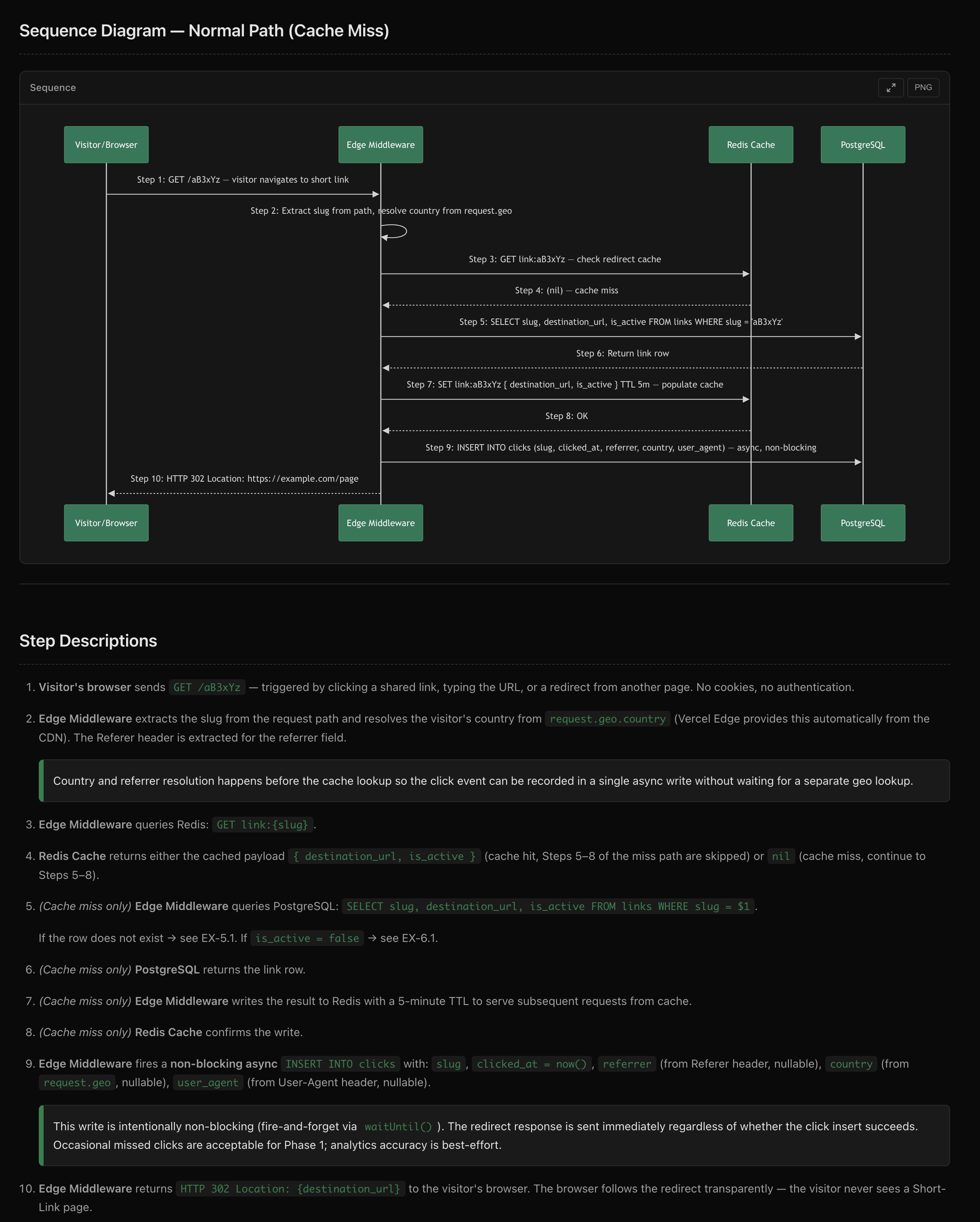
The sequence diagram shows 10 steps across 4 participants (Visitor/Browser, Edge Middleware, Redis Cache, PostgreSQL), with detailed step descriptions including cache strategy, async click recording via waitUntil(), and HTTP 302 redirect semantics.
Key Design Decisions Captured
Section titled “Key Design Decisions Captured”- S01 — Token pattern:
crypto.randomBytes→ bcrypt hash, plain token returned once and never stored - S02 — HTTP 302 not 301: destinations can change (S04 edit), so permanent-cache 301 is wrong
- S02 — Async click recording:
INSERTfires viawaitUntil()after the redirect - S04 — Cache DEL on every mutation: explicit invalidation so the next visitor sees the correct state
API Surface Identified
Section titled “API Surface Identified”6 endpoints are identified and feed directly into Phase 3-2:
| Method | Endpoint | Scenario |
|---|---|---|
| POST | /api/links | S01 |
| GET | /:slug (Edge Middleware) | S02 |
| GET | /api/links/:slug | S04 |
| PATCH | /api/links/:slug | S04 |
| DELETE | /api/links/:slug | S04 |
| GET | /api/links/:slug/analytics | S03 |
Phase 3-2: API + DB Design
Section titled “Phase 3-2: API + DB Design”Prompt: Help me design the API spec then Help me design the database schema
The AI loads api-designer and db-designer Skills in sequence, reading the scenario sequence diagrams to produce a complete OpenAPI specification and database schema.
OpenAPI Specification
Section titled “OpenAPI Specification”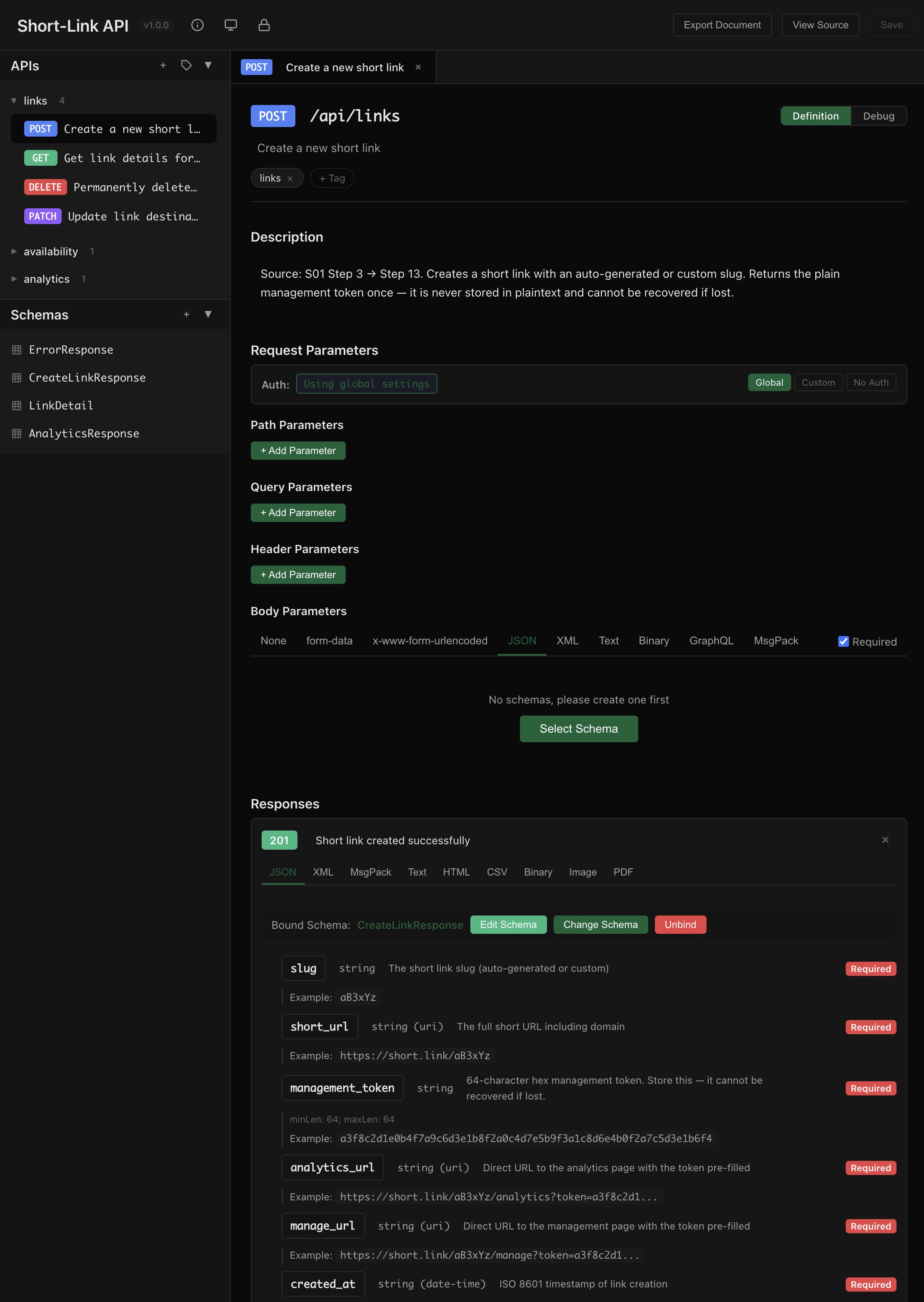
Every endpoint includes:
- Request parameters and body schema
- Response schemas with field descriptions and examples
- Error response specifications
- Source traceability back to scenario steps (e.g., “Source: S01 Step 3 → Step 13”)
Database Schema
Section titled “Database Schema”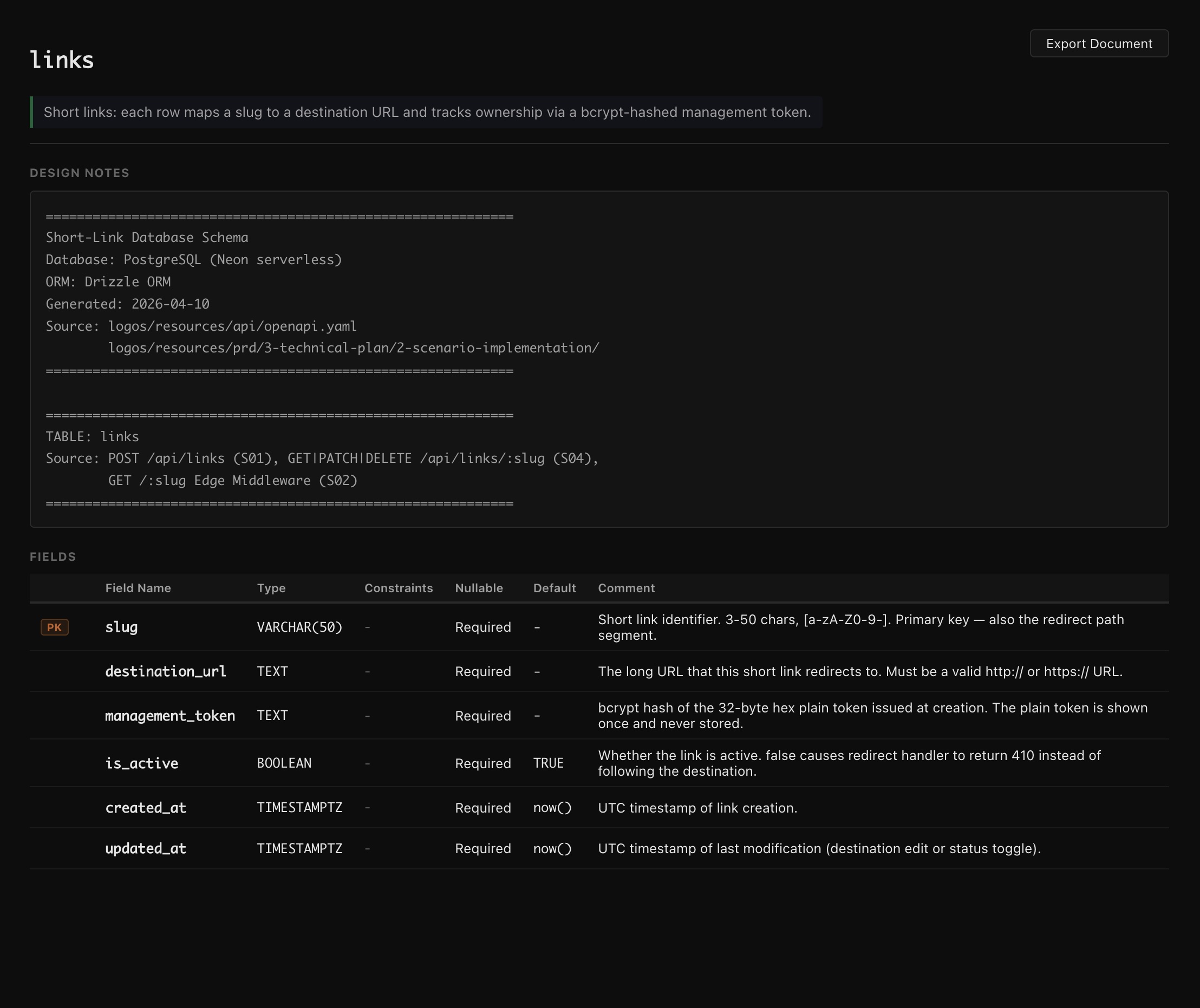
The links table schema is derived directly from the API spec and scenario requirements:
| Field | Type | Notes |
|---|---|---|
slug | VARCHAR(50) | PK, 3-50 chars [a-zA-Z0-9-] |
destination_url | TEXT | Valid http/https URL |
management_token | TEXT | bcrypt hash, plain token never stored |
is_active | BOOLEAN | Default TRUE, controls 302 vs 410 |
created_at | TIMESTAMPTZ | Default now() |
updated_at | TIMESTAMPTZ | Default now() |
A separate clicks table tracks analytics with referrer, country, and user_agent fields.
Phase 3-3: Test Case Design
Section titled “Phase 3-3: Test Case Design”Prompt: Help me design test cases
The AI loads the test-writer Skill and produces two levels of test specifications:
Unit Test Cases
Section titled “Unit Test Cases”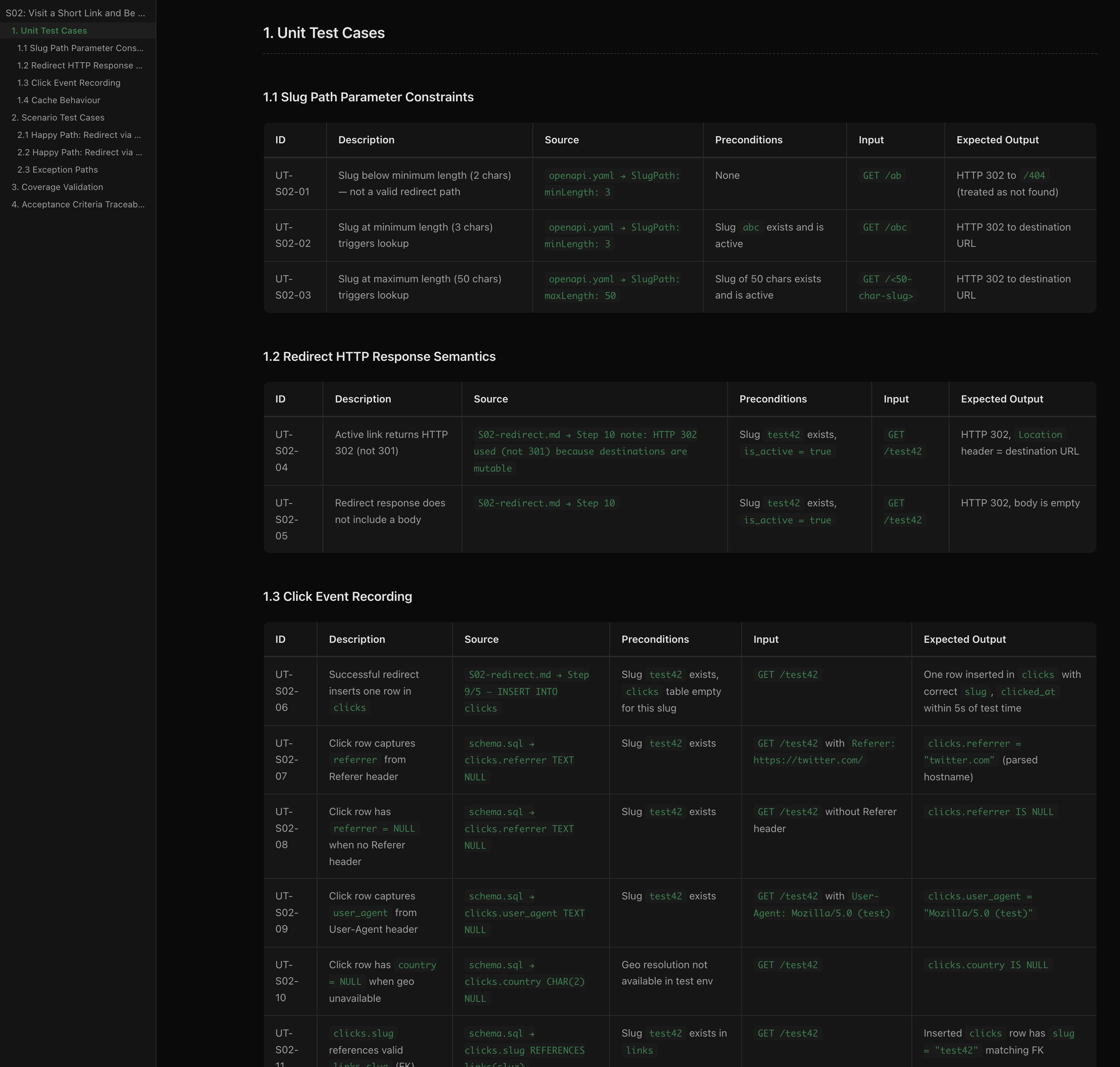
Each unit test case traces back to its source — the specific line in the OpenAPI spec or scenario document that requires this test:
- UT-S02-01 — “Slug below minimum length” → Source:
openapi.yaml → SlugPath: minLength: 3 - UT-S02-04 — “Active link returns HTTP 302 (not 301)” → Source:
S02-redirect.md → Step 10 note - UT-S02-06 — “Successful redirect inserts one row in clicks” → Source:
S02-redirect.md → Step 9/5
Scenario Test Cases
Section titled “Scenario Test Cases”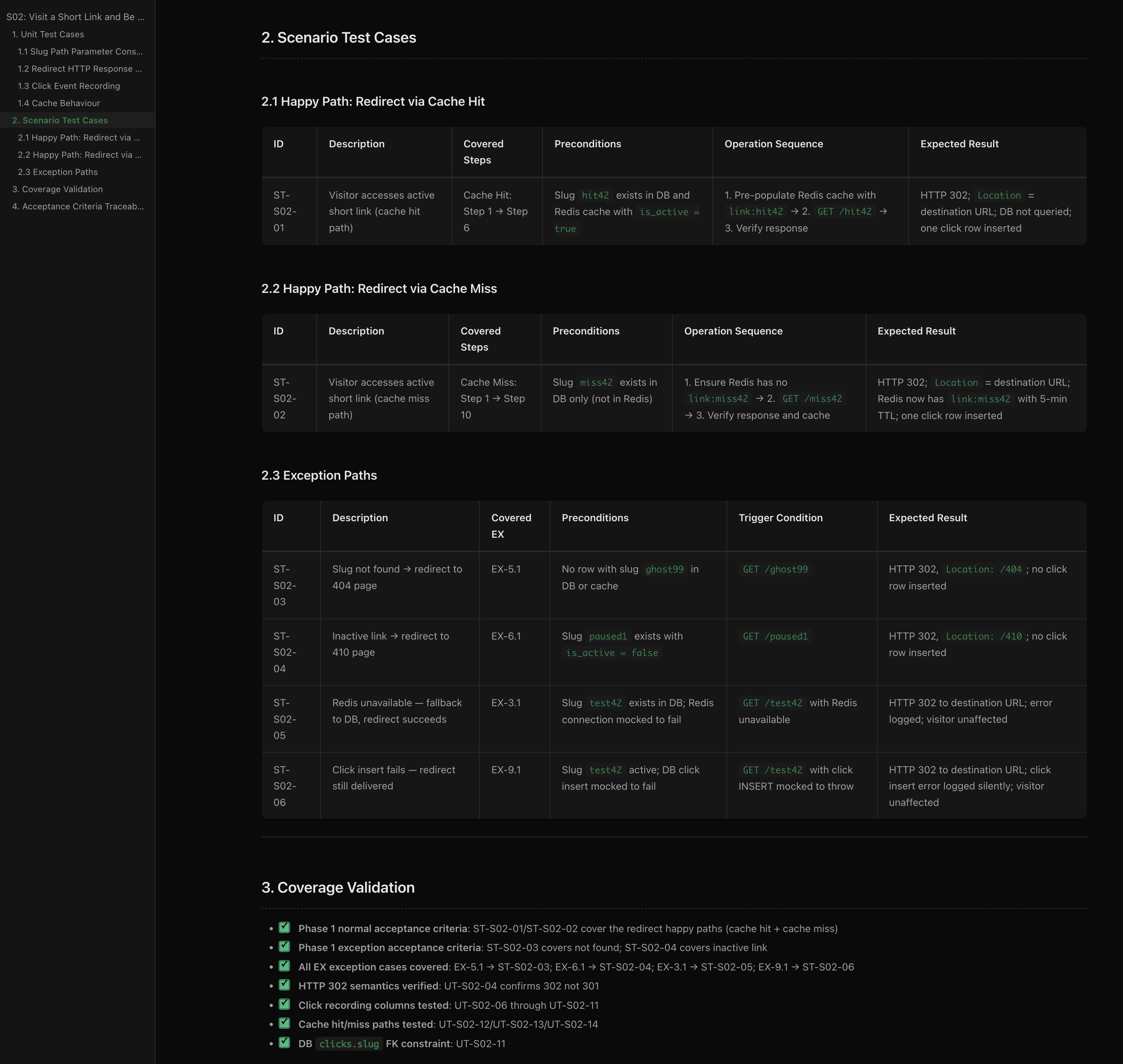
Scenario tests cover end-to-end flows:
- Happy paths — cache hit and cache miss redirect flows
- Exception paths — slug not found (404), inactive link (410), Redis unavailable (fallback to DB), click insert failure (redirect still delivered)
- Coverage validation — every acceptance criterion, every exception case in the sequence diagrams is mapped to at least one test
The test spec ensures 100% coverage of design documents before any code is written.
Phase 3-4: Code Generation
Section titled “Phase 3-4: Code Generation”Prompt: Help me implement S01
Now comes the moment where all the accumulated context pays off. The AI reads everything — requirements, design, architecture, sequence diagrams, API spec, DB schema, and test cases — then produces an implementation plan:
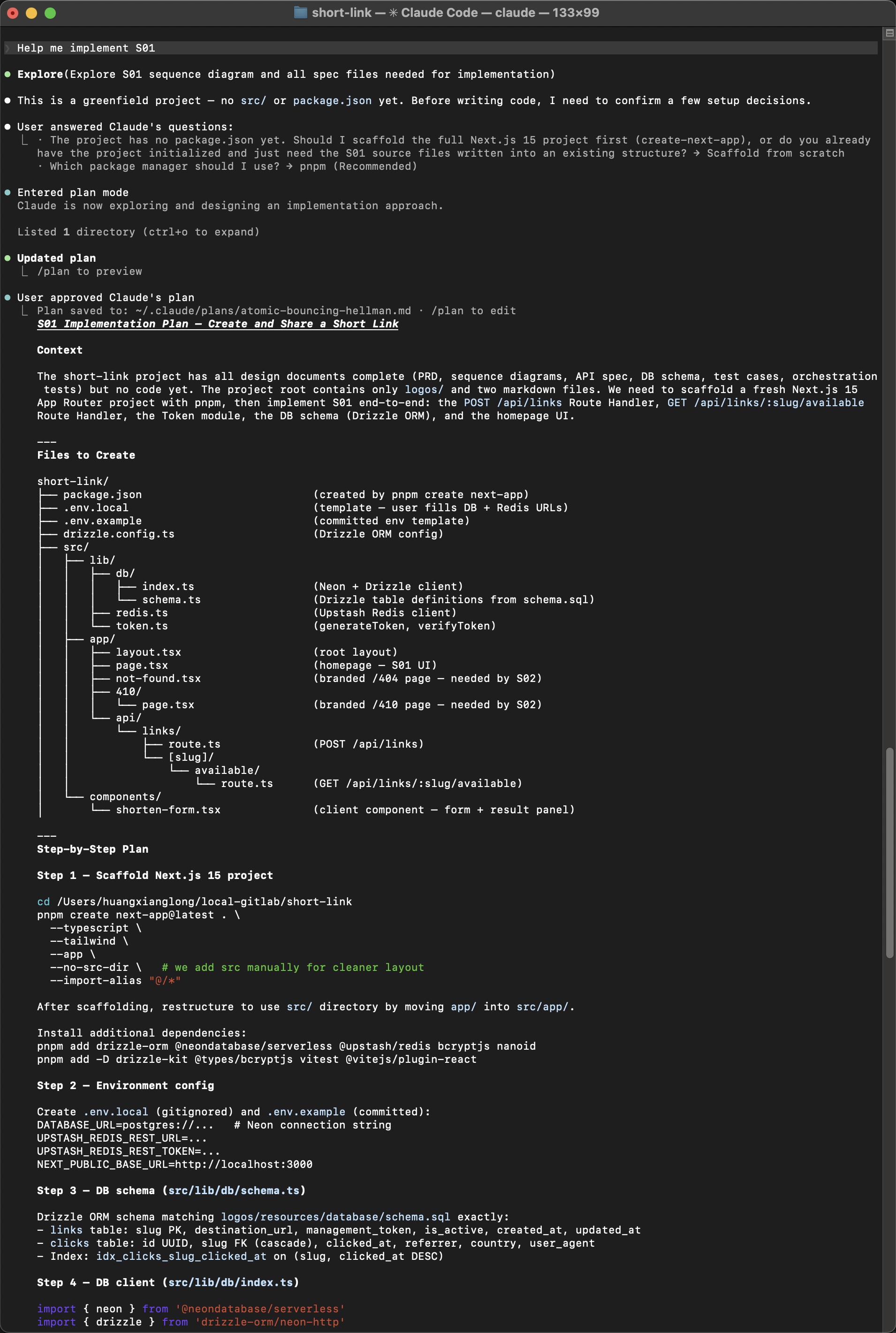
How documents become code
Section titled “How documents become code”The AI doesn’t guess — it references specific documents as it writes each file:
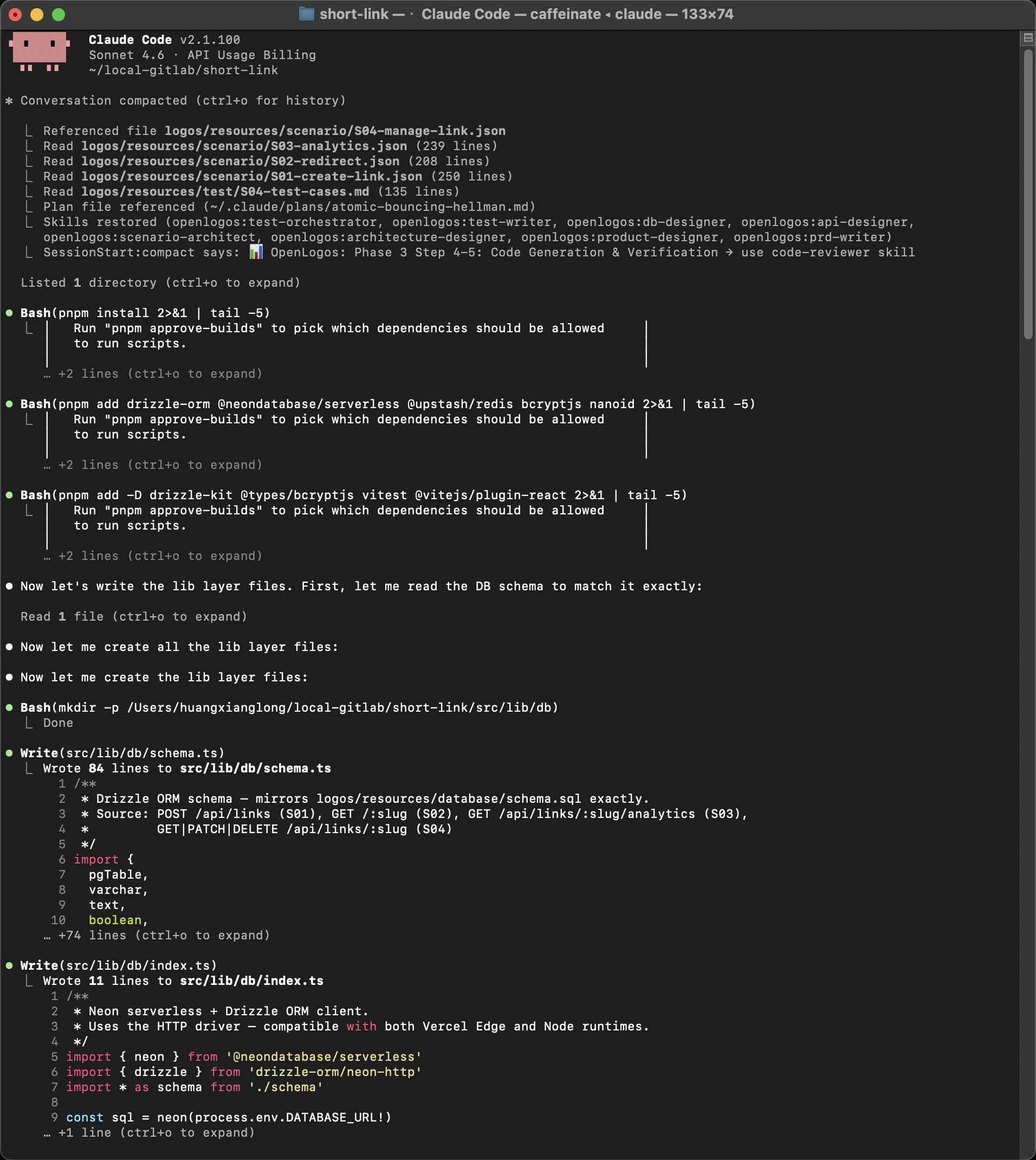
Notice how the AI explicitly states: “First, let me read the DB schema to match it exactly” — then generates schema.ts that mirrors logos/resources/database/schema.sql field by field.
Generated code quality
Section titled “Generated code quality”Every source file includes traceability comments pointing back to the design documents:
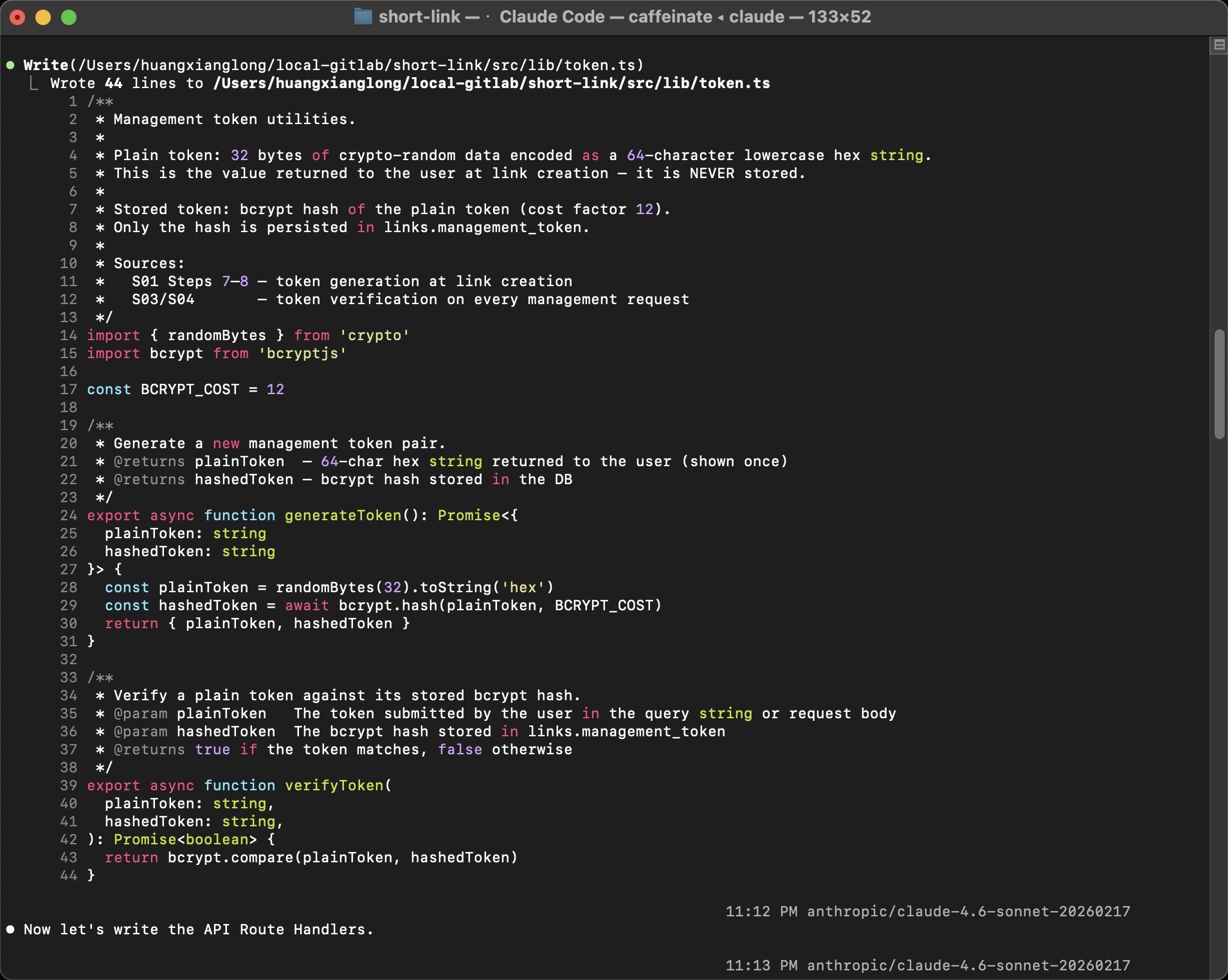
/** * Management token utilities. * * Sources: * S01 Steps 7–8 — token generation at link creation * S03/S04 — token verification on every management request */This is the opposite of “vibe coding” — every function exists because a scenario step required it, and you can trace the chain: Scenario → Sequence Diagram → API Spec → Code.
Phase 3-5: Verification
Section titled “Phase 3-5: Verification”Prompt: /openlogos:verify
The final phase runs all tests and validates coverage against the design documents:
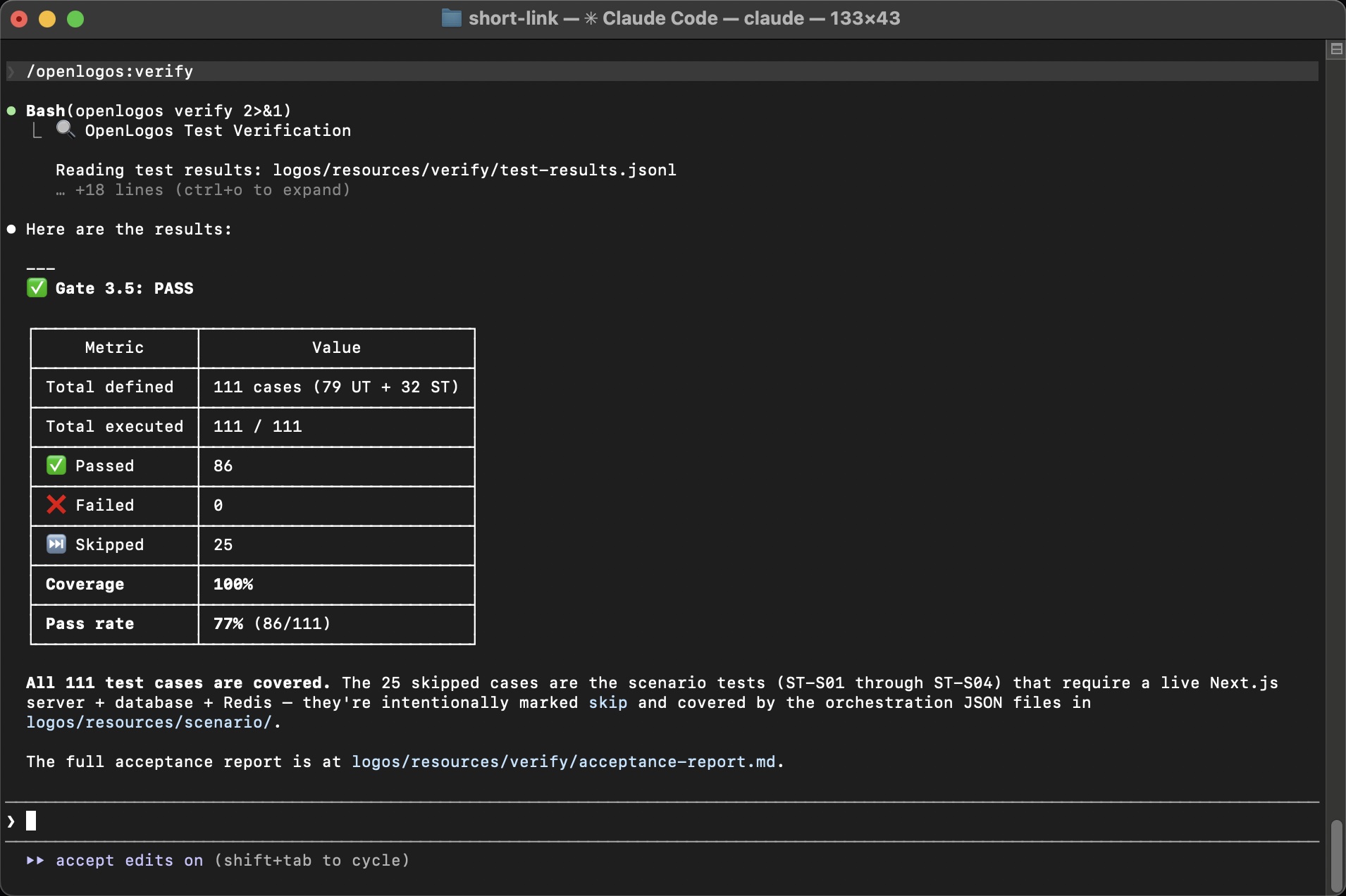
| Metric | Value |
|---|---|
| Total defined | 111 cases (79 UT + 32 ST) |
| Total executed | 111 / 111 |
| Passed | 86 |
| Failed | 0 |
| Skipped | 25 |
| Coverage | 100% |
| Pass rate | 77% (86/111) |
The 25 skipped cases are scenario tests (ST-S01 through ST-S04) that require a live Next.js server + database + Redis — they’re intentionally marked skip and covered by the orchestration JSON files in logos/resources/scenario/.
Gate 3.5: PASS — all test cases are covered.
Final Status
Section titled “Final Status”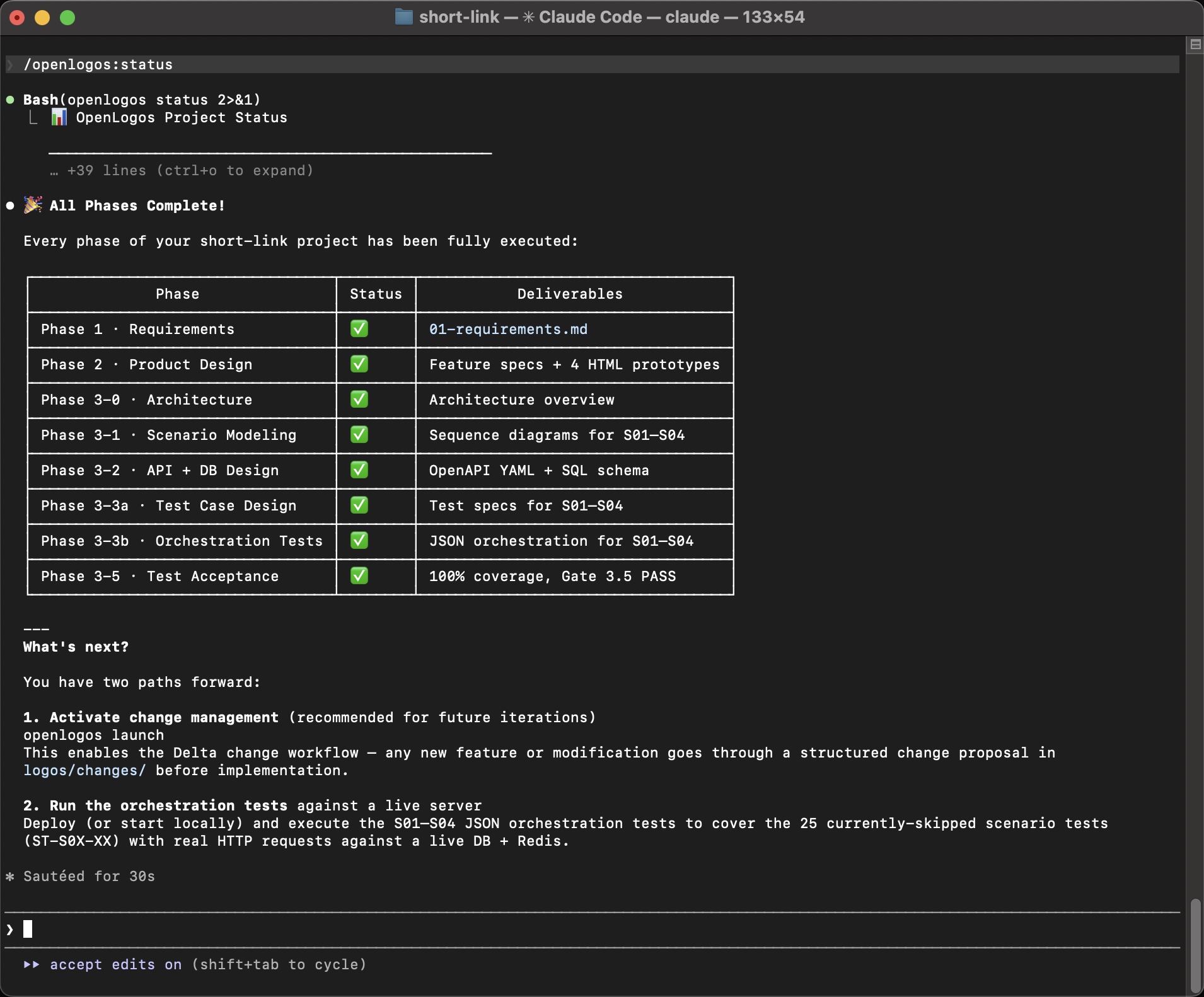
🎉 All Phases Complete!
Phase 1 · Requirements       ✅  01-requirements.mdPhase 2 · Product Design     ✅  Feature specs + 4 HTML prototypesPhase 3-0 · Architecture     ✅  Architecture overviewPhase 3-1 · Scenario Modeling ✅  Sequence diagrams for S01–S04Phase 3-2 · API + DB Design  ✅  OpenAPI YAML + SQL schemaPhase 3-3a · Test Case Design ✅  Test specs for S01–S04Phase 3-3b · Orchestration    ✅  JSON orchestration for S01–S04Phase 3-4 · Code + Test Code  ✅  Business code + test code with reporterPhase 3-5 · Test Acceptance  ✅  100% coverage, Gate 3.5 PASS
What just happened?
Section titled “What just happened?”In about 60 minutes of human involvement (mostly answering questions), you went from “A URL shortening service” to:
- 239-line requirements document with 4 scenarios and acceptance criteria
- 303-line feature specification with interaction flows and UI components
- 4 interactive HTML prototypes you can click through in a browser
- 257-line architecture document with system diagram and tech stack rationale
- 5 scenario documents with 22+ sequence diagrams and 18 exception cases
- OpenAPI specification with 6 endpoints, 4 schemas, full examples
- Database schema with 2 tables, indexes, and constraints
- 111 test cases (79 unit + 32 scenario) with full source traceability
- Production-ready code — scaffolded Next.js project with all route handlers, DB layer, and tests
- Gate 3.5 PASS — 100% coverage of design documents
Every artifact is a plain text file in logos/resources/. Every decision is documented. Every line of code traces back to a scenario step. If a new developer joins tomorrow, they can read the full design chain and understand why every piece of code exists.
What’s next?
Section titled “What’s next?”-
Activate change management
Terminal window openlogos launchThis enables the Delta workflow — any future modification goes through a structured change proposal in
logos/changes/before implementation. The AI performs impact analysis across all layers to ensure nothing falls out of sync. -
Run orchestration tests against a live server
Deploy locally or to Vercel, then execute the S01–S04 JSON orchestration tests to cover the 25 currently-skipped scenario tests with real HTTP requests against a live DB + Redis.
-
Explore real project tours
See how this methodology plays out on real projects:
-
Dive deeper into concepts
- Three-Layer Model — understand the WHY → WHAT → HOW progression
- Scenario-Driven + Test-First — how scenarios drive everything
- Documents as Context — why plain text documents beat “vibe coding”